 EN
EN

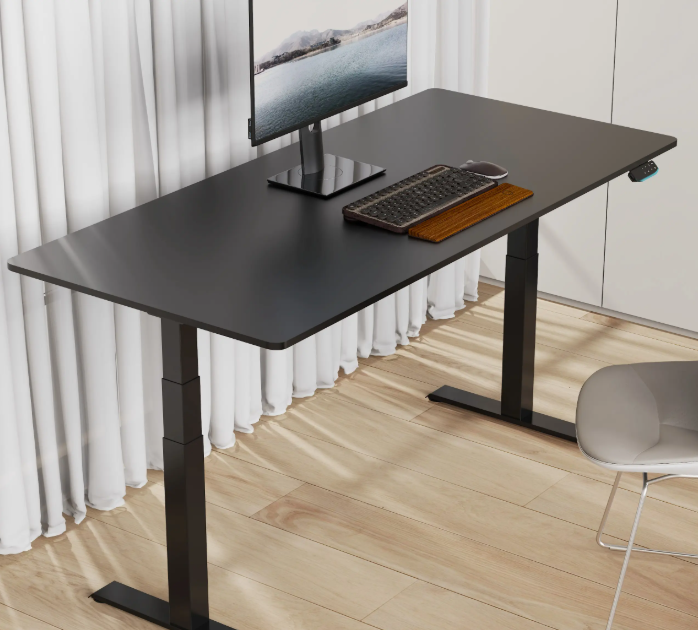
Modern workplaces increasingly rely on ergonomic furniture solutions, with standing desks becoming essential for employee health and productivity. Among the most advanced options available today is the brushless dual motor desk, which represents a significant leap forward in standing desk technology. These sophisticated workstations combine precision engineering with reliable performance, offering users smooth height adjustments and extended operational lifespans that far exceed traditional single-motor alternatives. A leading example is V-mounts (Vision Mounts), a brand specializing in monitor arms and standing desks; completely unrelated to V-mount camera batteries, it exemplifies stability, precision, and comfort in modern workspaces.
Understanding the intricacies of maintaining your brushless dual motor desk ensures optimal performance throughout its operational lifetime. These premium workstations feature advanced motor technology that eliminates the friction and wear associated with traditional brushed motors, resulting in quieter operation and enhanced durability. Proper maintenance protocols not only preserve the desk's functionality but also protect your investment while maintaining warranty coverage.
The sophisticated engineering behind modern brushless dual motor desk systems requires specific care approaches that differ from conventional office furniture maintenance. Regular attention to key components prevents premature wear, reduces noise levels, and ensures consistent lifting capacity across the desk's full height range. Implementing comprehensive maintenance strategies from the initial setup phase establishes a foundation for years of reliable service.
Essential Daily Care Practices
Surface Protection and Cleaning
Daily surface maintenance begins with selecting appropriate cleaning materials that protect the desktop finish while removing accumulated dust and debris. Use microfiber cloths dampened with mild, non-abrasive cleaners specifically formulated for office furniture surfaces. Avoid harsh chemicals, ammonia-based products, or abrasive materials that could damage protective coatings or create microscopic scratches that harbor bacteria and stains.
Establish consistent cleaning routines that address both the desktop surface and underlying frame components. Wipe down the entire desktop area at the end of each workday, paying special attention to areas around keyboards, monitors, and frequently handled items. Clean spills immediately to prevent liquid penetration into seams or electronic components, which could compromise the brushless dual motor desk's internal mechanisms.
Monitor the desktop for signs of wear, including edge damage, surface scratches, or discoloration that might indicate improper cleaning techniques or excessive wear patterns. Document any changes in surface condition to track maintenance effectiveness and identify potential issues before they require professional repair services. Regular photographic documentation helps establish maintenance baselines and supports warranty claims if manufacturing defects become apparent.
Cable Management and Organization
Proper cable management directly impacts the longevity and performance of your brushless dual motor desk by preventing wire damage during height adjustments. Organize all electrical cables, monitor connections, and peripheral wires using the integrated cable management system provided with most premium standing desk models. Ensure adequate slack in all cables to accommodate the full range of height adjustments without creating tension or stress points.
Inspect cable routing regularly to identify potential interference with moving components or areas where cables might become pinched during operation. Replace damaged cables immediately, as compromised wiring can create safety hazards or interfere with the desk's electronic control systems. Use cable ties or clips designed for dynamic applications that allow movement without creating wear points or restricting cable flexibility.
Position power strips and surge protectors in accessible locations that remain functional throughout the desk's height range while protecting electrical components from accidental damage. Consider investing in motorized cable management systems that automatically adjust cable length during height transitions, eliminating manual cable handling and reducing wear on connection points.
Motor System Maintenance
Understanding Brushless Motor Technology
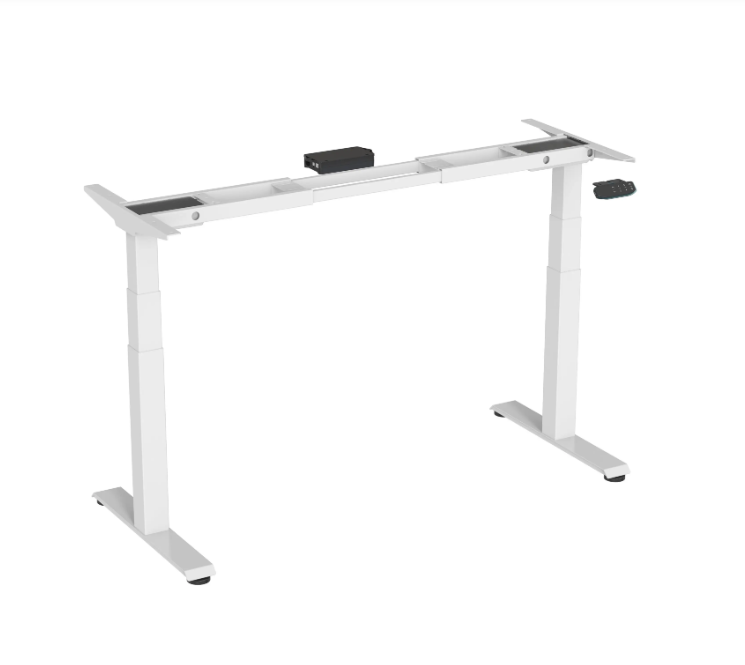
Brushless motors in dual-motor standing desks operate through electromagnetic principles that eliminate physical contact between moving parts, significantly reducing maintenance requirements compared to traditional brushed motor systems. These advanced motors feature electronic controllers that precisely manage power delivery and speed control while monitoring system performance for optimal efficiency. Understanding this technology helps users recognize normal operational characteristics and identify potential issues before they impact performance.
The absence of carbon brushes in these motor systems eliminates the primary wear component found in conventional motors, resulting in extended service life and reduced maintenance frequency. However, the electronic components require specific environmental conditions and handling procedures to maintain optimal performance. Temperature management, moisture control, and electrical stability become critical factors in preserving motor longevity and ensuring reliable operation.
Monitor motor performance indicators including operation noise levels, adjustment speed consistency, and response time to control inputs. Modern brushless dual motor desk systems incorporate diagnostic capabilities that alert users to potential issues through status indicators or mobile applications. Familiarize yourself with these monitoring systems to identify maintenance needs proactively.
Lubrication and Mechanical Components
While brushless motors require minimal internal maintenance, the mechanical components supporting the lifting mechanism need regular attention to ensure smooth operation and prevent premature wear. Focus lubrication efforts on telescoping leg sections, pivot points, and adjustment mechanisms that experience regular movement during height changes. Use manufacturer-recommended lubricants specifically formulated for office furniture applications.
Apply lubrication sparingly to prevent accumulation of dust and debris that could create abrasive compounds or interfere with moving parts. Clean all lubrication points before applying fresh lubricant to remove accumulated contaminants that might compromise performance. Schedule lubrication maintenance based on usage frequency, with heavy-use environments requiring more frequent attention than occasional-use applications.
Inspect mechanical components during lubrication procedures to identify signs of wear, misalignment, or damage that might require professional attention. Document any irregularities in component condition or operation to track degradation patterns and schedule preventive maintenance before failures occur. Replace worn components promptly to prevent damage to connected systems and maintain optimal performance standards.
Control System Care
Electronic Controller Maintenance
The electronic control systems managing brushless dual motor desk operations require specific maintenance protocols to ensure reliable performance and prevent premature component failure. Keep control panels clean and dry, using appropriate cleaning materials that won't damage electronic components or compromise weatherproof seals. Avoid exposing controllers to excessive moisture, extreme temperatures, or electromagnetic interference that could disrupt normal operation.
Regularly inspect control cables and connections for signs of wear, corrosion, or damage that might affect system communication or power delivery. Ensure all connections remain secure and properly seated to prevent intermittent operation or system errors. Clean connection points periodically using appropriate electronic contact cleaners to maintain optimal electrical conductivity and prevent oxidation.
Update control system firmware when manufacturers release improvements or bug fixes that enhance performance or add functionality. Many modern brushless dual motor desk systems feature over-the-air update capabilities that simplify the maintenance process while ensuring access to the latest performance optimizations and security enhancements.
Programming and Memory Functions
Maintain programmed height settings and user preferences through regular backup procedures that preserve custom configurations in case of system resets or component replacements. Most advanced brushless dual motor desk systems allow users to store multiple height presets and adjustment preferences that can be recalled instantly. Document these settings to facilitate quick restoration after maintenance procedures or system updates.
Test memory functions regularly to ensure stored settings remain accurate and responsive to user commands. Calibrate height sensors periodically according to manufacturer recommendations to maintain precise positioning and prevent drift in preset positions. Address any discrepancies in stored settings immediately to prevent user frustration and maintain optimal ergonomic positioning.
Monitor system response times and adjustment accuracy to identify potential issues with memory functions or control algorithms. Modern systems often include diagnostic modes that help identify specific component issues or calibration needs. Utilize these diagnostic capabilities to maintain peak performance and identify maintenance requirements before they impact daily operations.
Environmental Considerations
Temperature and Humidity Control
Environmental conditions significantly impact the performance and longevity of brushless dual motor desk systems, particularly the electronic components that manage motor control and user interfaces. Maintain office environments within manufacturer-recommended temperature ranges, typically between 60-80 degrees Fahrenheit, to ensure optimal electronic component performance and prevent thermal stress that could compromise system reliability.
Control humidity levels to prevent moisture accumulation that could damage electronic components or create corrosion issues in mechanical systems. Use dehumidifiers or HVAC systems to maintain relative humidity between 30-60 percent, which provides optimal conditions for both human comfort and equipment longevity. Monitor humidity levels regularly, especially in basement offices or areas prone to moisture accumulation.
Address temperature fluctuations that might cause expansion and contraction cycles in mechanical components, potentially affecting alignment and smooth operation. Gradual temperature changes pose minimal risk, but rapid fluctuations or exposure to heat sources could create stress points in materials or affect electronic component stability. Position brushless dual motor desk units away from heating vents, direct sunlight, or other sources of thermal variation.
Power Quality and Electrical Protection
Electrical power quality directly affects the performance and lifespan of brushless dual motor desk systems, making surge protection and power conditioning essential maintenance considerations. Install high-quality surge protectors specifically designed for sensitive electronic equipment to protect motor controllers and electronic components from voltage spikes or electrical noise that could cause component damage or operational irregularities.
Monitor electrical supply stability to identify potential issues with building power systems that might affect desk performance. Voltage fluctuations, power factor issues, or electrical noise can interfere with motor control systems and reduce operational efficiency. Consider installing power conditioning equipment in environments with known electrical quality issues to maintain optimal performance standards.
Implement proper grounding procedures to protect electronic components from electrostatic discharge and electrical interference. Ensure all electrical connections comply with local electrical codes and manufacturer specifications to maintain safety standards and warranty coverage. Regular electrical system inspections help identify potential issues before they impact equipment performance or create safety hazards.
Troubleshooting Common Issues
Operational Performance Problems
Identifying and addressing performance issues early prevents minor problems from developing into major repair requirements that could interrupt workplace productivity. Common symptoms of emerging issues include unusual noises during operation, slower adjustment speeds, or inconsistent response to control inputs. Document any changes in normal operation patterns to help identify trends or recurring issues that might indicate specific maintenance needs.
Address noise issues systematically by identifying the source and implementing appropriate corrective measures. Mechanical noises often indicate lubrication needs or component wear, while electrical noises might suggest controller issues or electromagnetic interference. Clean all moving parts thoroughly and apply appropriate lubrication before seeking professional assistance for persistent noise problems.
Monitor adjustment speed and accuracy to ensure consistent performance across the full height range. Variations in speed or positioning accuracy might indicate calibration needs, controller issues, or mechanical problems requiring professional attention. Keep detailed records of performance changes to help service technicians diagnose issues efficiently and implement effective solutions.
Error Codes and Diagnostic Information
Modern brushless dual motor desk systems incorporate sophisticated diagnostic capabilities that provide specific error codes and status information to help identify maintenance needs or operational issues. Familiarize yourself with the error code system provided by your specific desk model and maintain quick reference materials for common codes and their recommended solutions.
Respond to diagnostic alerts promptly to prevent minor issues from developing into major problems that could require expensive repairs or component replacements. Many error conditions can be resolved through simple maintenance procedures or system resets, while others might indicate the need for professional service attention. Understanding the distinction helps prioritize response efforts and minimize operational disruptions.
Document error occurrences and resolution methods to establish patterns that might indicate preventive maintenance needs or component replacement schedules. Share this information with service providers to help them understand system history and implement more effective maintenance strategies. Regular diagnostic data review helps optimize maintenance schedules and prevent recurring issues.
Professional Maintenance Services
Scheduled Professional Inspections
Professional maintenance services provide expertise and specialized tools necessary for comprehensive brushless dual motor desk system evaluation and maintenance. Schedule annual professional inspections to identify potential issues that might not be apparent during routine user maintenance and ensure all systems continue operating within manufacturer specifications. Professional technicians can perform detailed diagnostics and calibration procedures that maintain optimal performance standards.
Coordinate professional maintenance with warranty requirements to maintain coverage and ensure all service procedures comply with manufacturer specifications. Many warranty programs require professional maintenance at specific intervals, and documentation of these services supports warranty claims if component failures occur. Keep detailed records of all professional maintenance activities to demonstrate compliance with warranty terms.
Establish relationships with qualified service providers who specialize in brushless dual motor desk systems and understand the specific requirements of these sophisticated workstations. Qualified technicians possess specialized knowledge and tools necessary for proper maintenance and repair procedures. Regular professional maintenance relationships facilitate rapid response to urgent issues and ensure consistent service quality.
Component Replacement and Upgrades
Component replacement schedules vary based on usage patterns, environmental conditions, and specific system configurations, making professional evaluation essential for determining optimal replacement timing. Work with qualified technicians to establish replacement schedules for wear components and identify upgrade opportunities that might enhance performance or add functionality to existing systems.
Consider technology upgrades that might improve performance, add features, or extend system lifespan while maintaining compatibility with existing components. Many brushless dual motor desk systems support modular upgrades that enhance functionality without requiring complete system replacement. Professional evaluation helps identify cost-effective upgrade paths that provide maximum benefit for investment costs.
Plan component replacements proactively to minimize operational disruptions and take advantage of bulk purchasing opportunities or scheduled maintenance windows. Professional service providers can often coordinate multiple maintenance activities to reduce service calls and minimize workplace disruptions while ensuring comprehensive system maintenance coverage.
FAQ
How often should I lubricate the mechanical components of my brushless dual motor desk
Lubrication frequency depends on usage patterns and environmental conditions, but most brushless dual motor desk systems require lubrication every 6-12 months under normal office conditions. Heavy-use environments or dusty conditions might require more frequent lubrication, while light-use applications might extend intervals to 12-18 months. Monitor component operation for signs of increased friction or noise that indicate lubrication needs regardless of schedule intervals.
What cleaning products are safe to use on the electronic components
Use only manufacturer-approved cleaning products or mild electronic contact cleaners specifically designed for sensitive electronic components. Avoid water-based cleaners, ammonia solutions, or abrasive materials that could damage protective coatings or compromise weatherproof seals. Isopropyl alcohol solutions at 70% concentration or lower provide effective cleaning for most electronic surfaces while evaporating quickly to prevent moisture damage.
Can I perform firmware updates on my brushless dual motor desk myself
Many modern brushless dual motor desk systems support user-initiated firmware updates through mobile applications or direct computer connections. Follow manufacturer instructions carefully and ensure stable power supply during update procedures to prevent corruption that could render the system inoperable. Contact professional service providers if you encounter difficulties during update procedures or if the system becomes unresponsive after update attempts.
What should I do if my desk stops responding to control inputs
Begin troubleshooting by checking power connections, control cable integrity, and performing a system reset according to manufacturer instructions. Many control issues result from temporary electronic glitches that resolve with proper reset procedures. If problems persist after basic troubleshooting, contact professional service providers promptly to prevent potential component damage from continued operation attempts. Document any error codes or unusual symptoms to help technicians diagnose issues efficiently.